<?xml version="1.0" encoding="utf-8"?>
<!-- Custom RSS Feed Generator -->
<feed xmlns="http://www.w3.org/2005/Atom">
  
  	<id>https://www.rowbyte.com/feed</id>
    <title>Rowbyte Feed</title>
    <updated>Feb 17 2026 12:00 PST</updated>
    <link rel="alternate" href="https://www.rowbyte.com"/>
    <link rel="self" href="https://www.rowbyte.com/feed"/>
  	<author><name>Rowbyte</name></author>
        <entry>
        	<id>tag:www.rowbyte.com,2026-02-17:/gallery/pluribus-joey-reinisch/</id>
    	
      <title>Pluribus - Joey Reinisch</title>
      <link rel="alternate" href="https://www.rowbyte.com/gallery/pluribus-joey-reinisch/"/>
      <published>2026-02-17T12:00:00-08:00</published>
            <updated>2026-02-17T12:00:00-08:00</updated>
            <content type="html" xml:base="https://www.rowbyte.com/gallery/pluribus-joey-reinisch/">
      <![CDATA[<p>Joey Reinisch created this elegant title intro for the hit TV show Pluribus using Stipple.</p>
<iframe width="560" height="315" src="https://www.youtube-nocookie.com/embed/HhodPPPXfxg?si=VGVb-3GWlPf1Xq_f" title="YouTube video player" frameborder="0" allow="accelerometer; autoplay; clipboard-write; encrypted-media; gyroscope; picture-in-picture; web-share" referrerpolicy="strict-origin-when-cross-origin" allowfullscreen></iframe>
<p>Make sure to checkout our <a href="/blog/pluribus-stipple">interview with Joey Reinisch</a>.</p>
<p>Direct Link: <a href="https://www.youtube.com/watch?v=HhodPPPXfxg">https://www.youtube.com/watch?v=HhodPPPXfxg</a></p>]]>
      
      </content>
    </entry>
        <entry>
        	<id>tag:www.rowbyte.com,2026-02-17:/blog/pluribus-stipple/</id>
    	
      <title>Pluribus Intro - Interview with Joey Reinisch</title>
      <link rel="alternate" href="https://www.rowbyte.com/blog/pluribus-stipple/"/>
      <published>2026-02-17T06:00:00-08:00</published>
            <updated>2026-02-17T06:00:00-08:00</updated>
            <content type="html" xml:base="https://www.rowbyte.com/blog/pluribus-stipple/">
      <![CDATA[<figure><img alt="" height="335" src="https://www.rowbyte.com/media/pages/blog/pluribus-stipple/01cb7eecd3-1771365040/pluribus_intro_1600.jpg" width="800"></figure> 
<p>Pluribus is a hit TV show created by Vince Gilligan (Breaking Bad &amp; Better Call Saul fame) that's streaming now on Apple TV. The title design for Pluribus features an <a href="https://www.youtube.com/watch?v=HhodPPPXfxg">elegant particle simulation</a> created using Stipple. We were lucky enough to score an interview with the designer of the titles <a href="https://www.instagram.com/joeyreinisch/">Joey Reinisch</a>, who is gracious enough to tell us about himself, his work, career and creative process.</p>
<!-- more -->
<h3>Please tell us a little about yourself.</h3>
<p>After graduating from Indiana University in 2007, I moved to LA with no real plan or prospects. Later on, I started working in the industry as a PA on the show <em>My Own Worst Enemy</em> through a lucky connection. I've been involved with Post Production ever since, working my way from Coordinator, Post Supervisor to Associate Producer before switching over to Editorial. I worked as an assistant editor for several years, before finally getting my first editing shot on Better Call Saul.</p>
<p>Outside of work, I'm at home with my wife, two sons and two pugs, all of whom I like very much. I play too many video games and watch a lot of terrible movies on purpose. I am also slowly coming to terms with being "middle aged".</p>
<h3>Looking at your <a href="https://www.imdb.com/name/nm3206380/">IMDB credits</a> - you’ve had an impressive career spanning diverse roles ranging from Art Director, Writer, Editor to Visual Effects. How would you describe your professional identity?</h3>
<p>The quickest way to describe it is <em>weaponized hyperfixation</em>. I truly enjoy the process of learning new artistic techniques, skills, and software. I tend to gather them with no real plan other than to learn, storing them in the back of my mind <em>"just in case"</em>. It is much easier to justify when I tell myself a skill may become useful in my career one of these days, months, or years.</p>
<p>I burn through a lot of <em>hobbies of the moment</em> and still get made fun of for wanting to learn something as niche as bookbinding. Once I figure out the broad strokes of how something works, I’m on to the next thing. When I graduated, I was creating an animated series called <em>Destructo Box</em> with my writing partner at the time, Phil McLaughlin. The show was a great justification for improving our various production skills, and we essentially treated it like a second job.</p>
<p>After picking up steam on Newgrounds, the show eventually became distributed by Mondo Media (Of Happy Tree Friends fame) who we eventually created a second series for called Game Program Attack! (along with it's spinoff War Soldiers.)  A lot of my <em>"just in case"</em> skills became useful as we improved and developed these shows as I was responsible for the look, animation pipeline and working with our character animator (Brian Carney) while Phil took the recording/editing tasks. With such a small team, I tried to be someone that could figure out a solution to any sort of creative challenge whether digitally or with traditional art techniques. One could say a jack of all trades but a master of none. My attention span is too short to be a master of anything, but as soon as I have a goal to achieve, I can usually make it happen one way or another.</p>
<h3>Tell us a bit about the history of your collaboration with Vince Gilligan. I see that you were also extensively involved in the production &amp; editing of Better Call Saul (one of my personal favorite shows).</h3>
<p>I started working on Better Call Saul in Season 4 as Assistant Editor to Chris McCaleb who had worked on it since the beginning. Eventually I would help set the <em>degradation</em> for the Main Title styles in seasons 4,5 and 6. Later on, I went on to edit a Breaking Bad 10th anniversary reel for the reunion panel at comicon which allowed me to get my first one on one experience working with Vince.</p>
<p>After helping Chris with the Better Call Saul Insider podcast, assiting Skip MacDonald on <em>El Camino</em> title design and co-editing the Season 5 episode <em>Bag Man</em> of BCS, I was promoted to edit two episodes of the final season, <em>Wine and Roses</em> and <em>Rock and Hard Place</em>. The crew were very supportive and post-producer Diane Mercer has been a huge advocate of mine even after Saul ended. Her reference played a key role in my hiring for <em>The Pitt</em>.</p>
<h3>Let’s talk about Pluribus. How did you get involved with this project?</h3>
<p>After having worked on the titles for both El Camino and Better Call Saul, I had a great working relationship with Vince and Diane that stretched past just my editorial job. We got to have many creative conversations and brainstorm with each other. Diane brought me in and trusted that eventually we'd be able to land somewhere they were happy with. I am by no means a "title designer" but I do enjoy the process of figuring things out when there's no true right or wrong answer. You can throw out a wild idea that may or may not work, but it's a space where you can have those conversations and let your mind go weird. Pluribus is such a huge, strange, beautiful thing and when Diane asked, I didn't hesitate.</p>
<h3>One of the most striking aspects of the Pluribus title design is how simple it looks yet it’s so effective. It conveys the show’s central themes in just a few seconds. Please explain the creative process behind the design.</h3>
<p>We knew from the outset we didn't want the titles to be long. Something you wouldn't need to skip. When we first met to talk about the title, one of the main themes I was chasing was building up an image using smaller pieces. Thinking of all the turned like cells of a bigger organism like the spray paint brush in MS Paint. I also used to have one of these automatic dot pens that would move the pen head up and down on it's own like a tattoo gun which I used to play with a lot. Another one of those things I had and tried for no reason than to try it, but that pointillism idea became something I started to hone in on as a stylistic angle. It seemed to be the quickest way to convey one of the main conceits of the show but could also be a cool visual. </p>
<p>We also wanted to incorporate the <em>signal</em> into the design and having it be a force that spreads this organism through the universe. Helping us see turned and un-turned oranisms switch over as it spreads. After this there was a ton of iteration and experiments. I even tried to zoom into the <em>cells</em> further down to a micro level to show that the dots themselves were <em>alive</em>. As we experimented, ideas and over complications fell off in service of a clean straightforward abstraction that I think really helped solidify the theme and played beautifully against Dave's music.</p>
<h3>So at what stage during the creative process did Stipple come into play?</h3>
<p>Once we had settled on the visual theme based on mockups, I went back in to experiment with After Effects / Photoshop in how to best convey that style in motion. I was trying lots of things. Filming glitter floating in water, punching holes in backlit black paper, live drawing over a moving timeline, and even messing with some particle simulations in Blender. If I remember correctly, I happened upon one of the Stipple tutorial videos while trying to dig deeper into particle playground. It seemed tailor made for this purpose.</p>
<p>One of the coolest things about using Stipple for this was sort of learning to speak it's language. How to subtly control the chaos by tweaking all of it's attraction variables and particle counts on top of my animation. Since I didn't want it to rigidly adhere to the animation so it felt more flowy and organic, it that meant you had to do a lot of experimentation to see how it handled things with 8000+ dots on screen. Another fun challenge is to hide the initialization of the dots since there are always 8000 even when there's fewer letters visible. </p>
<p>The animation itself is built on transparent greyscale because we wanted the signal ripples to move through the letters and disturb them, but not break them. A mere 1% opacity change on one of the pieces could completely change the way the animation looked. The final piece is a composite of about 6 different sub sequences overlaying a turbulent displacement matte controlling the <em>spread</em> of white through the darker dots while using separate pieces to keep the <em>non-turned</em> dots alive in the background. </p>
<p>All this while rendering at <strong>8K</strong> resolution so we are able to push in as close as we do in the opening shot without it degrading the quality.</p>
<h3>Do you have any advice for aspiring motion designers, editors, artists?</h3>
<p>I really don't consider myself a title designer so take any advice I give with a grain of salt. There are far more talented people out there doing far more amazing things than I am. I'm simply someone that enjoys experimenting with art. Had I found stipple before this project, there is an extremely good chance I would still have ended up buying it and playing with it anyway because it looks so cool, just another thing to add to the toolbox. </p>
<p>If you work in any sort of creative space, new and unexpected challenges will inevitably come up. My goal is to always be able to say "sure I can do that" when these things come up. That simple thing has opened way more doors for me than any degree or credit. Doing so requires constantly learning and going outside of your preferred medium or comfort zone to expand what you are capable of. </p>
<p>If you're someone that tends to only work digitally, try painting with watercolor, or sculpting just for the hell of it. All artistic skills feed back into your process in ways you don't expect. Does that mean I have a garage full of art supplies I use only a couple times a year? Yes. A hard drive full of software I rarely get to use? Absolutely. But being not only able, but willing to throw yourself headfirst into any creative problem, knowing you'll get there in the end, is one of the most valuble things I've learned along the way.</p>
<p><em>On that excellent note, it's time to conclude our fantastic interview with Joey Reinisch. Thanks a lot for sharing your experience and insight. You can follow him on <a href="https://www.instagram.com/joeyreinisch/">Instagram</a>.</em></p>
<p>For more information on Stipple, visit our product page.</p>
<p><a href="/stipple">Visit Stipple Product Page →</a></p>]]>
      
      </content>
    </entry>
        <entry>
        	<id>tag:www.rowbyte.com,2024-12-31:/blog/stipple-randomize-sprites-external-color-layers/</id>
    	
      <title>New Features in Stipple</title>
      <link rel="alternate" href="https://www.rowbyte.com/blog/stipple-randomize-sprites-external-color-layers/"/>
      <published>2024-12-31T06:00:00-08:00</published>
            <updated>2024-12-31T06:00:00-08:00</updated>
            <content type="html" xml:base="https://www.rowbyte.com/blog/stipple-randomize-sprites-external-color-layers/">
      <![CDATA[<figure><img alt="" height="400" src="https://www.rowbyte.com/media/pages/blog/stipple-randomize-sprites-external-color-layers/5896373cb2-1762763379/stipple_1600x800_black2.jpg" width="800"></figure> 
<p>I'm very excited to announce a new version of Stipple which adds the following two handy features.</p>
<h3>Randomize Sprites</h3>
<p>Now you can sample multiple the sprite layer at multiple times in the composition, randomize and use them to render the dots. </p>
<h3>Use External Layer for Colors</h3>
<p>In prior versions you're limited to using the source input layer to sample colors and also drive the simulation. With this feature, you can use a separate external layer to sample the colors of the points.</p>
<p>If you are not familiar with Stipple, our new plug-in for Adobe After Effects - It let's AE users create temporally coherent Image Stippling patterns driven by footage using a physics simulation. It's a lot of fun!</p>
<p><a href="/stipple">Visit Stipple Product Page →</a></p>]]>
      
      </content>
    </entry>
        <entry>
        	<id>tag:www.rowbyte.com,2024-06-04:/blog/stipple-image-stippling-for-after-effects/</id>
    	
      <title>Stipple - Image Stippling in After Effects</title>
      <link rel="alternate" href="https://www.rowbyte.com/blog/stipple-image-stippling-for-after-effects/"/>
      <published>2024-06-04T07:00:00-07:00</published>
            <updated>2024-06-09T07:00:00-07:00</updated>
            <content type="html" xml:base="https://www.rowbyte.com/blog/stipple-image-stippling-for-after-effects/">
      <![CDATA[<figure><img alt="" height="400" src="https://www.rowbyte.com/media/pages/blog/stipple-image-stippling-for-after-effects/ec8f8f2781-1762763379/stipple_1600x800_black2.jpg" width="800"></figure> 
<p>I'm very excited to announce Stipple, our upcoming new plug-in for Adobe After Effects. It let's AE users create temporally coherent Image Stippling patterns driven by footage using a physics simulation. It's a lot of fun!</p>
<p>Update: Stipple is available for sale now. Check it out!</p>
<p><a href="/stipple">Visit Stipple Product Page →</a></p>
<!-- more -->
<h2>Image Stippling?</h2>
<p>Stippling is an artistic technique that recreates images or patterns using small dots. They can be placed densely or spread out to achieve the detailed shading necessary. In the digital realm, Stippling can be seen as an extension to Dithering with much more visually appealing results.</p>
<p>Stipple sets itself apart by ensuring temporal coherence — dots move predictably between frames in a timeline. This is achieved through a physics simulation that makes the dots interact with each other and the image map, maintaining a consistent and coherent visual effect when applied to a video/animated footage</p>
<h2>Fun Features</h2>
<p>Stipple offers a range of exciting features:</p>
<ul>
<li>Map dot size and color to their velocity.</li>
<li>Use custom sprites for unique effects.</li>
<li>Stretch dots to create dynamic trails.</li>
<li>Explore many more creative options in the <a href="https://docs.rowbyte.com/stipple">detailed documentation</a>.</li>
</ul>
<h2>Examples</h2>
<p>Please watch the sample demos - I think it's the best way to understand what this effect does.</p>
<div class="sqgrid">
<div class="grid3">
<p><video muted loop autoplay playsinline src="https://rowbyte.s3.us-west-002.backblazeb2.com/stipple_banners/skull_02.mp4" 
poster="https://rowbyte.s3.us-west-002.backblazeb2.com/stipple_banners/skull_02.mp4"></video></p>
<p><video muted loop autoplay playsinline src="https://rowbyte.s3.us-west-002.backblazeb2.com/stipple_banners/Brain_Stipple_02.mp4" poster="https://rowbyte.s3.us-west-002.backblazeb2.com/stipple_banners/Brain_Stipple_02.mp4"></video></p>
<p><video muted loop autoplay playsinline src="https://rowbyte.s3.us-west-002.backblazeb2.com/stipple_banners/Marilyn0_01.mp4" 
poster="https://rowbyte.s3.us-west-002.backblazeb2.com/stipple_banners/Marilyn0_01.mp4"></video></p>
<p><video muted loop autoplay playsinline src="https://rowbyte.s3.us-west-002.backblazeb2.com/stipple_banners/stipple_fish_color_density_square.mp4" 
poster="https://rowbyte.s3.us-west-002.backblazeb2.com/stipple_banners/stipple_fish_color_density_square.mp4"></video></p>
<p><video muted loop autoplay playsinline src="https://rowbyte.s3.us-west-002.backblazeb2.com/stipple_banners/Horse_stipple_04.mp4" 
poster="https://rowbyte.s3.us-west-002.backblazeb2.com/stipple_banners/Horse_stipple_04.mp4"></video></p>
<p><video muted loop autoplay playsinline src="https://rowbyte.s3.us-west-002.backblazeb2.com/stipple_banners/map_stipple_yellow.mp4" 
poster="https://rowbyte.s3.us-west-002.backblazeb2.com/stipple_banners/map_stipple_yellow.mp4" ></video></p>
<p><video muted loop autoplay playsinline src="https://rowbyte.s3.us-west-002.backblazeb2.com/stipple_banners/fractal_stipple.mp4" 
poster="https://rowbyte.s3.us-west-002.backblazeb2.com/stipple_banners/fractal_stipple.mp4"></video></p>
<p><video muted loop autoplay playsinline src="https://rowbyte.s3.us-west-002.backblazeb2.com/stipple_banners/Tiger_Stipple_01.mp4" 
poster="https://rowbyte.s3.us-west-002.backblazeb2.com/stipple_banners/Tiger_Stipple_01.mp4"></video></p>
<p><video muted loop autoplay playsinline src="https://rowbyte.s3.us-west-002.backblazeb2.com/stipple_banners/Stipple_Fractal_07.mp4" 
poster="https://rowbyte.s3.us-west-002.backblazeb2.com/stipple_banners/Stipple_Fractal_07.mp4"></video></p>
<p><video muted loop autoplay playsinline src="https://rowbyte.s3.us-west-002.backblazeb2.com/stipple_banners/Walk_Stipple_02B.mp4" 
poster="https://rowbyte.s3.us-west-002.backblazeb2.com/stipple_banners/Walk_Stipple_02B.mp4"></video></p>
<p><video muted loop autoplay playsinline src="https://rowbyte.s3.us-west-002.backblazeb2.com/stipple_banners/stipple_pop_text.mp4" 
poster="https://rowbyte.s3.us-west-002.backblazeb2.com/stipple_banners/stipple_pop_text.mp4"></video></p>
<p><video muted loop autoplay playsinline src="https://rowbyte.s3.us-west-002.backblazeb2.com/stipple_banners/Florence_08_1.mp4" 
poster="https://rowbyte.s3.us-west-002.backblazeb2.com/stipple_banners/Florence_08_1.mp4"></video></p>
</div>
</div>
<p><a href="/stipple">Visit Stipple Product Page →</a></p>]]>
      
      </content>
    </entry>
        <entry>
        	<id>tag:www.rowbyte.com,2022-07-12:/blog/fast-bokeh-openfx-available/</id>
    	
      <title>Fast Bokeh Pro for OpenFX Now Available</title>
      <link rel="alternate" href="https://www.rowbyte.com/blog/fast-bokeh-openfx-available/"/>
      <published>2022-07-12T01:00:00-07:00</published>
            <updated>2022-07-12T01:00:00-07:00</updated>
            <content type="html" xml:base="https://www.rowbyte.com/blog/fast-bokeh-openfx-available/">
      <![CDATA[<figure><img alt="" height="450" src="https://www.rowbyte.com/media/pages/blog/fast-bokeh-openfx-available/19397b103d-1762763379/1600x900_fbpro_ofx.jpg" width="800"></figure>
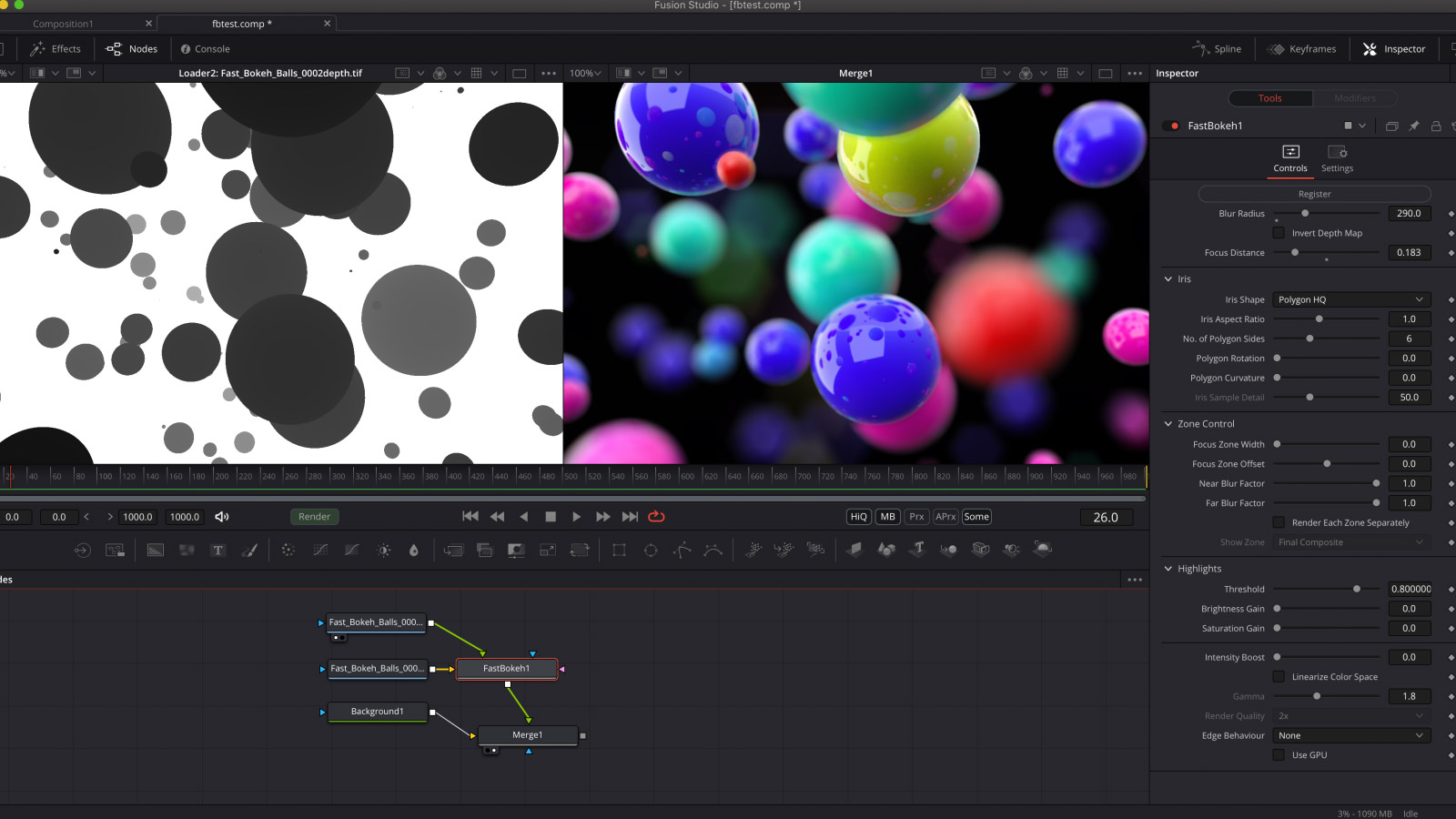
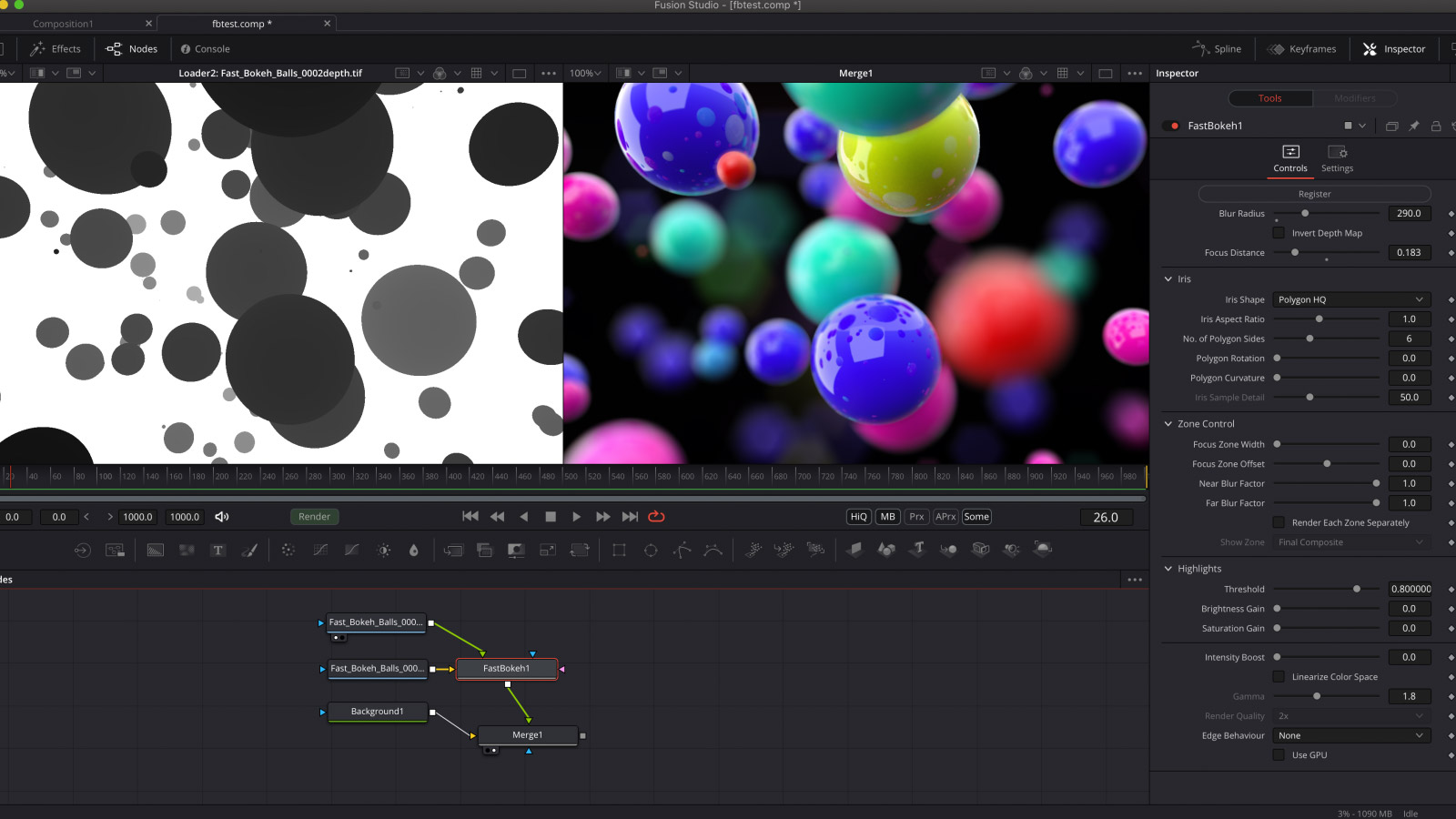
<p>We're very excited to announce the availability of <a href="/fast-bokeh-openfx">Fast Bokeh OpenFX</a> for OpenFX host applications like Black Magic Design Fusion Studio.  All the features are identical to the After Effects version except some UI related changes/limitations. Fast Bokeh v2 has the following new features.</p>
<ul>
<li>Custom Iris Shapes</li>
<li>Zone Control</li>
<li>GPU Acceleration using Metal/Compute.</li>
</ul>
<p><a href="/fast-bokeh-openfx">Fast Bokeh for OpenFX →</a></p>
<p>If you have any issues/feedback, please do <a href="/contact">contact us</a>.</p>]]>
      
      </content>
    </entry>
        <entry>
        	<id>tag:www.rowbyte.com,2021-10-27:/blog/after-effects-multi-frame-rendering/</id>
    	
      <title>After Effects CC 2022 - Multi Frame Rendering Update</title>
      <link rel="alternate" href="https://www.rowbyte.com/blog/after-effects-multi-frame-rendering/"/>
      <published>2021-10-27T13:00:00-07:00</published>
            <updated>2021-10-27T13:00:00-07:00</updated>
            <content type="html" xml:base="https://www.rowbyte.com/blog/after-effects-multi-frame-rendering/">
      <![CDATA[<p>We don't normally write a blog post for every new update of AE, but this is a special one. A brand new version of After Effects is out (CC 2022 or just v22) and it has a killer new feature called <strong>Multi Frame Rendering (MFR)</strong>. It is one of those features that make you go "uh interesting" when you read about it - but once you start using it there is no way you can ever go back to a version without it.</p>
<p>We're glad to say that all our products (except Buena Depth Cue) support the new MFR feature in AE. So make sure you download the latest versions and enjoy with with CC 2022! Also huge congrats to the AE team and kudos to them for working with third party plug-in developers from day one.</p>
<h2>Download</h2>
<p><a href="/plexus#download">Plexus→</a></p>
<p><a href="/aura#download">Aura→</a></p>
<p><a href="/tv-distortion-bundle#download">TV Distortion Bundle→</a></p>
<p><a href="/fast-bokeh#download">Fast Bokeh Pro→</a></p>
<p>Feel free to <a href="/contact">contact us</a> if you have further questions.</p>]]>
      
      </content>
    </entry>
        <entry>
        	<id>tag:www.rowbyte.com,2021-09-29:/blog/fast-bokeh-openfx-beta/</id>
    	
      <title>Introducing Fast Bokeh OpenFX Beta</title>
      <link rel="alternate" href="https://www.rowbyte.com/blog/fast-bokeh-openfx-beta/"/>
      <published>2021-09-29T01:00:00-07:00</published>
            <updated>2022-07-13T18:42:00-07:00</updated>
            <content type="html" xml:base="https://www.rowbyte.com/blog/fast-bokeh-openfx-beta/">
      <![CDATA[<figure><img alt="" height="450" src="https://www.rowbyte.com/media/pages/blog/fast-bokeh-openfx-beta/9ee23415ab-1762763379/1600x900_fbpro_ofx.jpg" width="800"></figure>
<p>We're very excited to announce <a href="/fast-bokeh">Fast Bokeh</a> beta for OpenFX host applications like Black Magic Design Fusion Studio. It's an open beta so everyone can download, try it out. If you have any feedback, please do <a href="/contact">contact us</a>. </p>
<!-- more -->
<h2>Download</h2>
<p><em>Update</em>: The beta is officially over and you can download a full commercial version here<br />
<a href="/fast-bokeh-openfx">Fast Bokeh for OpenFX →</a></p>
<h2>Install</h2>
<p>After unzipping the files, place the plugin files in the OpenFX plugin location in your machine. It's usually the following.</p>
<p>macOS: /Library/OFX/Plugins/<br />
Windows: C:\Program Files\Common Files\OFX\Plugins</p>
<h2>FAQ</h2>
<h3>Will it work on all OpenFX hosts?</h3>
<p>May be. It's designed &amp; tested with Fusion Studio 17. If your host application is having issues, please <a href="/contact">let us know</a>.</p>
<h3>Is it functionally identical to AE version?</h3>
<p>They're almost identical. The only difference is not being able to pick the focus depth using a Point picker and no Iris/Zone Preview in the Effect Controls.</p>
<h3>What are the beta restrictions?</h3>
<p>Beta versions are fully functional. But it's still subject to our EULA.</p>
<h3>Can I use it in a commercial project?</h3>
<p>Yes. But we recommend caution, since it's a beta program you might experience issues.</p>
<h3>When will the beta expire?</h3>
<p>The current beta version will expire Nov 30 2021. After that, the plugin renders a watermark.</p>
<h3>Is there a Linux version?</h3>
<p>Currently only macOS and Windows are supported.</p>
<h3>Does the plug-in use GPU?</h3>
<p>GPU acceleration is optional. The plug-in doesn't use the host application's native GPU render pipeline yet.</p>
<h3>Documentation</h3>
<p>You can refer to the docs of the AE version for now - <a href="https://docs.rowbyte.com/fast-bokeh/">Fast Bokeh Documentation</a>.</p>
<h3>I have some feedback or thoughts.</h3>
<p>Feel free to <a href="/contact">contact us</a>.</p>]]>
      
      </content>
    </entry>
        <entry>
        	<id>tag:www.rowbyte.com,2021-04-19:/blog/fast-bokeh-v2/</id>
    	
      <title>Introducing Fast Bokeh Pro v2.0</title>
      <link rel="alternate" href="https://www.rowbyte.com/blog/fast-bokeh-v2/"/>
      <published>2021-04-19T01:00:00-07:00</published>
            <updated>2021-04-19T01:00:00-07:00</updated>
            <content type="html" xml:base="https://www.rowbyte.com/blog/fast-bokeh-v2/">
      <![CDATA[<figure><img alt="" height="450" src="https://www.rowbyte.com/media/pages/blog/fast-bokeh-v2/f6478f60d4-1762763379/fbpro_v2_bw_1600x900.jpg" width="800"></figure>
<p>Image Credit: <a href="/gallery/digital-debris-nicola-destefanis">Nicola Destefanis</a></p>
<p>We're very excited to announce a major update to <a href="/fast-bokeh">Fast Bokeh</a> with some amazing new functionality. Fast Bokeh v2 has the following new features.</p>
<ul>
<li>Custom Iris Shapes</li>
<li>Zone Control</li>
<li>GPU Acceleration using Metal/Compute.</li>
</ul>
<!-- more -->
<h2>Custom Iris Shapes</h2>
<p>Finally! Now you can use your own images as Iris shapes to create customized Bokeh blur. Custom Iris Shapes combined with GPU acceleration gives amazing results with super fast render times.</p>
<h2>Zone Control</h2>
<p>Technically known as Segmentation, this feature helps users avoid pixel spillage from foreground and background zones into areas that are focused. You can separate the scene into multiple zones and render them separately to get razor sharp focus zones.</p>
<h2>GPU Compute</h2>
<p>You can also utilize your machine's GPU to accelerate render times even more. Fast Bokeh supports GPU rendering using the latest technologies like Metal 2 and GL Compute. </p>
<h2>Upgrade</h2>
<p>Fast Bokeh Pro 2 is a free update to all registered users of v1. Just download the latest installer, install it and enjoy the latest cool new features!</p>
<h2>Videos</h2>
<p>Check out the amazing video created by <a href="/gallery/digital-debris-nicola-destefanis">Nicola Destefanis</a>. Also, checkout the <a href="//tutorials/fastbokeh-overview">Fast Bokeh Overview</a> and <a href="/tutorials/fastbokeh-zonecontrol">Zone Control</a> tutorials.</p>
<p><a href="/fast-bokeh">Fast Bokeh for After Effects →</a></p>]]>
      
      </content>
    </entry>
        <entry>
        	<id>tag:www.rowbyte.com,2021-04-18:/gallery/digital-debris-nicola-destefanis/</id>
    	
      <title>Digital Debris - Nicola Destefanis</title>
      <link rel="alternate" href="https://www.rowbyte.com/gallery/digital-debris-nicola-destefanis/"/>
      <published>2021-04-18T13:00:00-07:00</published>
            <updated>2021-04-18T13:00:00-07:00</updated>
            <content type="html" xml:base="https://www.rowbyte.com/gallery/digital-debris-nicola-destefanis/">
      <![CDATA[<p>London based <a href="http://nicola.tv">Nicola Destefanis</a> created this beautiful personal project with the theme "Sorting out my insomnia patterns", a visual exploration of insomnia disorder. They used <a href="/fast-bokeh">Fast Bokeh</a> extensively to create realistic Depth of Field.</p>
<p>From the description, "Done in C4D, Redshift, X-Particles and Fast Bokeh Pro for After Effects".</p>
<p>Don't forget to checkout their website &amp; demo reel - <a href="http://nicola.tv">Nicola.tv</a> that contains other phenomenal work.</p>
<iframe src="https://player.vimeo.com/video/530711800?byline=0" width="640" height="360" frameborder="0" webkitallowfullscreen mozallowfullscreen allowfullscreen></iframe>
<p>Direct Link: <a href="https://vimeo.com/530711800">https://vimeo.com/530711800</a></p>]]>
      
      </content>
    </entry>
        <entry>
        	<id>tag:www.rowbyte.com,2020-01-14:/blog/aura-export-svg-illustrator/</id>
    	
      <title>Export SVG Vectors From Aura To Adobe Illustrator</title>
      <link rel="alternate" href="https://www.rowbyte.com/blog/aura-export-svg-illustrator/"/>
      <published>2020-01-14T18:00:00-08:00</published>
            <updated>2020-01-14T18:00:00-08:00</updated>
            <content type="html" xml:base="https://www.rowbyte.com/blog/aura-export-svg-illustrator/">
      <![CDATA[<figure><img alt="" height="400" src="https://www.rowbyte.com/media/pages/blog/aura-export-svg-illustrator/25513ef159-1762763379/aura_svg_export_banner_1600x800.jpg" width="800"></figure>
<p>We're very excited to kick things off in the new year with an important update to <a href="/aura">Aura for After Effects</a>, which finally lets you export SVG files from Aura. SVG is a resolution independent vector file format and can be opened in Adobe Illustrator. This lets you work in AE using Aura at a much lower resolution and export them in vector format, which are very useful for print projects.</p>
<!-- more -->
<h2>SVG Export</h2>
<figure><img alt="" height="276" src="https://www.rowbyte.com/media/pages/blog/aura-export-svg-illustrator/a88f8f3090-1762763379/svg_dialog.png" width="381"></figure>
<p>You can export just a single frame as a SVG file or the entire Composition/Work Area as a SVG file sequence. If exporting SVG file sequence you can also set the frame rate.</p>
<p><em>Important Note</em>: Due to the limitations of SVG file specifications, the surface shading in the vector files will be slightly different from the raster version in AE. </p>
<p><a href="/aura">Aura for After Effects →</a></p>]]>
      
      </content>
    </entry>
    
</feed>